
Next.js Rendering Strategies: Optimizing for Web Vitals
In modern web development, performance is about how and when you deliver code. Next.js allows you to switch between different strategies on a per-page basis, directly impacting Web Vitals like FCP, LCP, and TTFB.
If those abbreviations are new, here’s a quick breakdown before we dive into each rendering mode:
What these metrics mean
-
TTFB (Time to First Byte)
- Measures the time between the browser requesting the page and the arrival of the first byte from the server.
- Analogy: How long it takes for the waiter to bring your first glass of water after you sit down.
- Why it matters: If the server is slow to process the request (for example, a complex SSR fetch), the browser is waiting and nothing can render yet.
- Good score: under 0.8 seconds.
-
FCP (First Contentful Paint)
- Measures how long it takes for the first piece of content to appear on the screen.
- Analogy: When the waiter brings out the breadbasket. You don’t have your meal yet, but you know something is happening.
- Why it matters: It gives perceived performance — the user knows the page is loading.
- Good score: under 1.8 seconds.
-
LCP (Largest Contentful Paint)
- Measures how long it takes for the largest visible element in the viewport to finish rendering.
- Analogy: When your main course arrives. This is what the user came for.
- Why it matters: It’s the most user-centric metric and marks when the page feels useful.
- Good score: under 2.5 seconds.
1. Static Site Generation (SSG)
In SSG, HTML is generated at build time and served via a Global CDN.
-
When to use:
- Landing pages
- Documentation Portals
- Marketing pages
- Content that does not change frequently
-
How it helps performance:
- No server computation at request time results in extremely low TTFB.
- Provides the best possible scores for FCP and LCP.
2. Incremental Static Regeneration (ISR)
ISR allows you to rebuild or update static content at a fixed interval without a full site rebuild.
// Example: App Router - Regenerate the page every 60 seconds
export const revalidate = 60
-
When to use:
- Blogs
- Product pages
- Content-driven applications
-
Why it helps performance:
- Keeps pages static for the majority of requests.
- Avoids full rebuilds while maintaining a strong LCP.
- Keeps refreshing data.
3. Server-Side Rendering (SSR)
SSR generates HTML on the server for every request, ensuring users see real-time, personalized content.
// Example: Generating HTML on every request (App Router)
export default async function Page() {
  const res = await fetch('https://api.example.com/data', { cache: 'no-store' })
  const data = await res.json()

  return (
    <main>
      <h1>Dynamic Data</h1>
      <pre>{JSON.stringify(data, null, 2)}</pre>
    </main>
  )
}
-
When to use:
- SEO-critical pages with highly dynamic data
- Pages requiring request-time personalization
-
Trade-offs:
- Increased server load
- Higher TTFB because the browser waits for the backend to render
4. Client-Side Rendering (CSR)
CSR renders content entirely in the browser. This is the default behavior for standard React apps.
"use client"

import { useEffect, useState } from 'react'

export default function Dashboard() {
  const [data, setData] = useState(null)

  useEffect(() => {
    fetch('/api/user')
      .then((res) => res.json())
      .then(setData)
  }, [])

  if (!data) return <p>Loading...</p>

  return <div>Welcome, {data.name}</div>
}
-
When to use:
- Private dashboards and internal tools
- Authenticated areas where SEO isn't a priority
-
Downsides:
- Poor FCP/LCP if content waits for JavaScript
- Higher hydration costs because the page is initially empty
Conclusion
There is no single best strategy. Use SSG/ISR for speed and SEO, and reserve SSR/CSR for highly dynamic or private data. Choose wisely to keep your Web Vitals in the green.
Rendering Strategy Summary
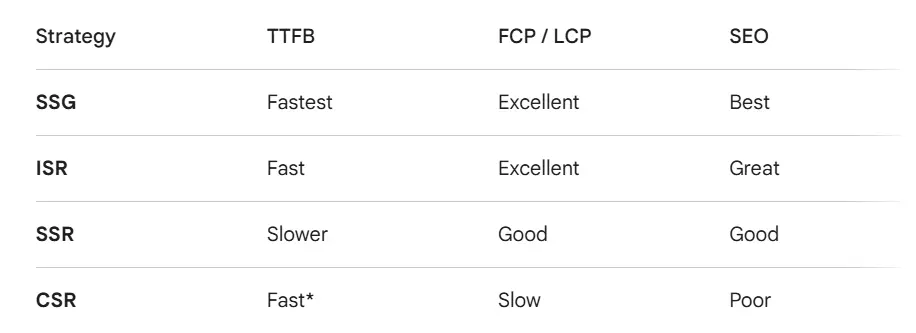
TTFB is fast for the shell, but slow for the actual content.